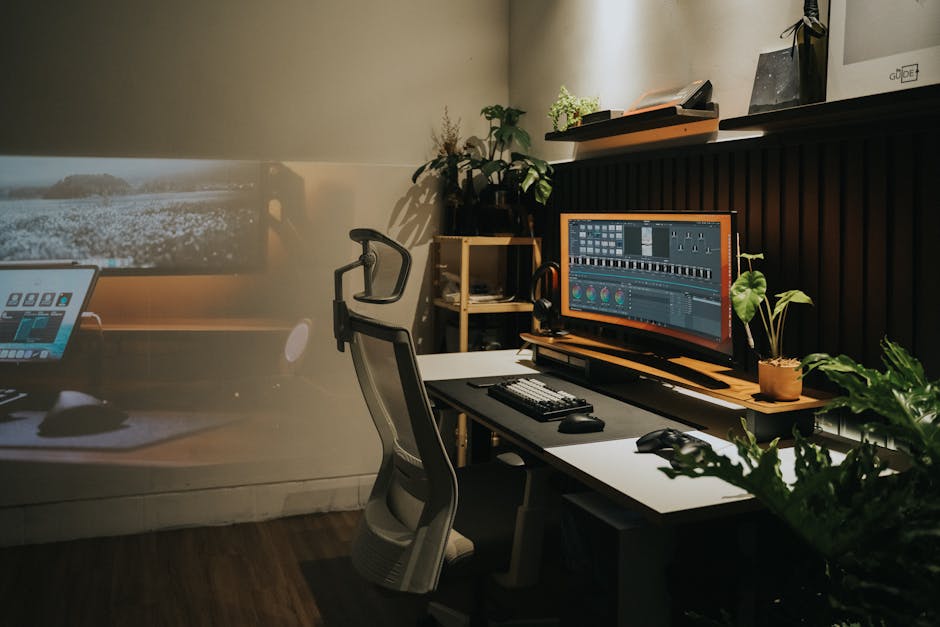
The average remote worker spends roughly 1,700 hours per year in their office chair — more time than they’ll spend sleeping in a bed they likely paid $1,200 or more for. Yet 67% of home office workers are sitting on chairs that cost under $200, according to a 2023 survey by Stanford’s Future of Work Lab. The back pain epidemic among remote workers isn’t primarily a posture problem. It’s a purchasing decision problem.
The Ergonomics Industry Has a Serious Misinformation Problem
Walk into any office supply retailer and you’ll see the word “ergonomic” attached to chairs selling for $89. That label is essentially meaningless — there’s no standardized certification body in the US, UK, or Australia that governs its use. A chair can be marketed as ergonomic because it has a fixed lumbar bump and a mesh back. That’s it.
The International Ergonomics Association defines ergonomics as “the scientific discipline concerned with understanding interactions between humans and other elements of a system.” A chair that’s ergonomic for a 5'4" person is not ergonomic for someone who’s 6'1". This is the core insight most buyers miss: ergonomic is a fit specification, not a product specification.
This distinction changes everything about how you should evaluate and purchase a chair.
The Six Adjustments That Separate Functional Ergonomic Chairs from Marketing
 Foto: paulabassi2
A genuinely ergonomic chair isn’t defined by mesh panels or a high price tag. It’s defined by the range and precision of its adjustments. Six variables determine whether a chair can be configured to support your specific body.
Seat Height and Seat Depth
Seat height should allow your feet to rest flat on the floor with knees at roughly 90–100 degrees. For most adults, this means an adjustment range of 16–21 inches. Seat depth (front-to-back) needs to allow 2–4 finger widths between the front edge of the seat pan and the back of your knees. Seats too deep force a forward slouch; too shallow and they cut into the thighs, restricting circulation over long sessions.
According to BIFMA (Business and Institutional Furniture Manufacturer’s Association) standards — the closest thing to an industry benchmark in North America — quality ergonomic seating should accommodate the 5th through 95th percentile of adult body dimensions. Many budget chairs cover perhaps 40% of that range.
Lumbar Support and Backrest Angle
Lumbar support gets the most attention, but its effectiveness depends on two factors buyers routinely ignore: height adjustability and firmness. A lumbar pad fixed at one height works for one spine. Adjustable lumbar that moves 3–4 inches up or down accommodates a much broader population.
Backrest recline matters more than most buyers realize. Research published in Spine (Woodhouse et al., 2006) used MRI imaging to show that a 135-degree recline angle distributes spinal disc pressure most evenly. A locked-upright 90-degree position — the default on most entry-level ergonomic chairs — actually increases intradiscal pressure compared to a moderate recline. Chairs with tension-controlled recline and a seat tilt mechanism address this directly; chairs without it don’t.
Armrest Configuration
Armrests are the most dismissed adjustment category, and the most consequential one after lumbar support. Set at the wrong height, they force the shoulders into a chronically elevated position, loading the trapezius and upper cervical spine across an entire workday. That constant low-grade tension is a primary driver of afternoon neck stiffness in desk workers.
The four armrest adjustments — height, width, depth, and pivot — are labeled “4D” in most product specifications. Height positions your elbow at desk surface level. Width brings the pad under your natural elbow position rather than forcing your arms inward or outward. Depth slides the pad forward or back to support your forearm without reaching. Pivot rotates the pad to match your forearm angle, particularly relevant for anyone who uses a keyboard at an angle. Chairs with only 1D or 2D armrests — height only, or height and width — leave at least two of these fit variables unaddressed. Over an eight-hour session, those gaps compound into measurable fatigue.
What the Research Actually Shows About Chair Price vs. Outcomes
Here’s where the data gets uncomfortable for anyone who’s just spent $1,500 on a Herman Miller Aeron.
A 2019 systematic review in Applied Ergonomics analyzing 28 studies on office seating found that chair adjustability combined with user education about those adjustments produced better musculoskeletal outcomes than chair quality alone. A $500 chair you understand how to configure frequently outperforms a $1,500 chair used at factory defaults.
The same review found:
- Workers who received a 20-minute ergonomic setup session reported 32% fewer neck and shoulder complaints after 3 months
- Adjustable lumbar support reduced lower back discomfort by 21% compared to fixed lumbar designs
- Seat pan tilt and height adjustment had the strongest correlation with reduced hip flexor fatigue during 6+ hour sessions
- Chair feature awareness — simply knowing what adjustments exist — improved musculoskeletal outcomes independent of the chair itself
The takeaway: budget for setup knowledge, not just hardware. The most expensive mistake in a home office is a premium chair used at factory defaults by someone who never read the setup guide.
Ergonomic Chair Comparison — Mid-Range to Premium
 Foto: RDNE Stock project
The market clusters into three price brackets, each with distinct trade-offs. This table covers chairs that genuinely deliver the core adjustment variables — not chairs that merely claim to.
| Chair | Price (USD) | Seat Height Range | Lumbar Adjustment | Armrests | Warranty | Best For |
|---|---|---|---|---|---|---|
| Flexispot OC3 | $219 | 17–21" | Fixed curve | 1D (height only) | 2 years | Light-use / secondary workstations |
| Branch Ergonomic Chair | $329 | 16.5–21" | Height-adjustable | 3D | 5 years | Home offices on a budget |
| Secretlab Titan Evo | $499 | 16–20" | Height + firmness | 4D | 5 years | Hybrid/gaming users, narrower seat preference |
| Herman Miller Aeron (Size B) | $1,445 | 16–20.5" | PostureFit SL | 4D | 12 years | 5'3"–6'0", high daily usage |
| Steelcase Leap V2 | $1,575 | 15.5–20" | Self-adjusting LiveBack | 4D + pivot | 12 years | Dynamic sitters, 8+ hour sessions |
A few notes worth unpacking:
- “4D armrests” means height, width, depth, and pivot adjustment — the full range required to eliminate shoulder elevation
- Herman Miller’s PostureFit SL simultaneously supports the sacrum and lumbar vertebrae, which most competitors address only partially
- Steelcase Leap’s LiveBack technology flexes with your spine rather than acting as a rigid panel — a meaningful differentiator for people who naturally shift position throughout the day
- The Branch chair at $329 hits all six critical adjustment categories without the premium price point, making it the strongest value proposition in this table
For remote workers in the US, UK, or AU sitting 6–10 hours daily, Branch represents the best entry point that doesn’t compromise structural adjustability. The Secretlab performs well for under-6-hour sessions but has a narrower seat pan that doesn’t suit all body types.
How Body Type Should Drive Your Shortlist
Most review sites skip this. Chair ergonomics is anthropometric — it’s about human measurements — and the same chair performs very differently depending on height, weight distribution, and habitual sitting posture.
Tall users (6'1"+): Prioritize seat depth range (minimum 17–20"), a backrest height of at least 22" from the seat, and armrests that extend above 30" from the floor. The Herman Miller Aeron Size C and Steelcase Leap V2 accommodate taller users well. The Branch chair tops out at 21" seat height, which may be insufficient for inseams over 32".
Shorter users (under 5'4"): Seat height floor matters — you need a minimum low point of 16" or under. Many premium chairs bottom out at 17", which forces shorter sitters into a forward-tilted pelvis position. The Humanscale Freedom and Haworth Fern are designed with shorter-torso accommodation in mind. Look for footrest compatibility in any chair that doesn’t reach your floor height.
Higher body weight (250 lbs+): Look for chairs rated to at least 300 lbs with reinforced seat pan construction. BIFMA G1 certification (the weight and durability standard) is worth verifying. Both the Steelcase Amia and Herman Miller Aeron carry this rating. Seat pan foam density degrades faster under higher loads — a 10-year warranty matters more in this category than others.
Wide hip width (over 18" seated): Most standard seat pans measure 18–20" across. If your seated hip measurement pushes against that limit, lateral pressure restricts blood flow to the legs and produces fatigue that shows up as restlessness rather than pain — easy to misattribute. The Steelcase Gesture and HAG Capisco both offer wider seat configurations and are worth prioritizing on your shortlist.
The Buying Decision Framework
 Foto: F1Digitals
The process below cuts through the noise that makes this purchase harder than it should be.
Step 1 — Determine your daily sit time. Under 4 hours? A $250–$400 mid-range chair with basic adjustability is defensible. Over 6 hours? Budget $500+ and treat this like a workstation investment, not a furniture purchase.
Step 2 — Measure before you buy. While seated, measure: floor to back of knee (determines seat height need), sitting hip width at its widest point (determines seat width), and floor to base of shoulder blade (determines backrest height requirement).
Step 3 — Prioritize adjustability over aesthetics. A chair that looks great but has a fixed lumbar pad and 1D armrests will fail you within 18 months of daily use. Adjustment range is the specification to optimize for, not visual design.
Step 4 — Factor in a trial period. Herman Miller, Steelcase, and Branch all offer return windows. The only real ergonomic test is four consecutive 8-hour workdays. Buy from a retailer that allows 30-day returns.
Step 5 — Set it up correctly on day one. Seat height first (feet flat, knees at 90–100°), then lumbar (positioned at the inward curve of your lower back, not mid-spine), then armrests (elbows at desk height, shoulders relaxed). This five-minute calibration is responsible for the majority of the chair’s ergonomic benefit.
One final variable that’s routinely underestimated: monitor height relative to your seated eye level. A correctly configured chair paired with a screen that’s 3 inches too low produces cervical strain within weeks regardless of lumbar support quality.
Final Verdict
The ergonomic chair market rewards research, not brand loyalty. A $329 Branch chair configured correctly will deliver better real-world outcomes than a $1,200 chair at factory defaults. The Steelcase Leap V2 remains the technical benchmark for heavy daily users — its LiveBack system and 4D pivot armrests accommodate dynamic movement rather than enforcing static ideal posture. For budget-constrained home offices, the Branch hits all six critical adjustment categories without the premium markup.
If you’re sitting more than 6 hours a day on a chair that cost under $150, you’re not saving money — you’re deferring costs into physiotherapy bills, lost concentration, and afternoon fatigue that compounds over years. Use the sizing framework above, take advantage of return windows, and spend 10 minutes on proper setup. That combination — the right chair, sized correctly, configured once — is what the research consistently shows reduces musculoskeletal complaints. Not the brand name on the back.
Start with the Branch Ergonomic Chair as your baseline comparison, then assess whether your daily workload justifies the step up to a Steelcase or Herman Miller investment. Either way, measure first, configure immediately, and move every 90 minutes.
Frequently Asked Questions
What makes a chair truly ergonomic?
True ergonomics is a fit specification, not a product specification. A genuinely ergonomic chair is defined by its range and precision of adjustments—not by mesh panels or price. The chair must be configurable to support your specific body dimensions.
What are the 6 key adjustments in an ergonomic office chair?
The six critical adjustments are: seat height (16–21 inches for most adults), seat depth (allowing 2–4 finger widths behind knees), lumbar support, armrest height, backrest recline, and tilt tension control. These enable proper configuration for different body types.
Why are most home office chairs inadequate despite being labeled ergonomic?
The term ’ergonomic’ has no standardized certification in the US, UK, or Australia, so it’s essentially meaningless marketing. 67% of home office workers use chairs under $200 that may only have a fixed lumbar bump and mesh back, lacking the adjustability needed for individual body support.


